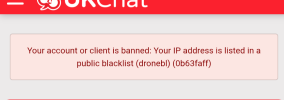
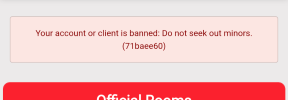
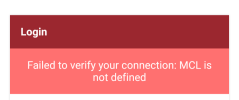
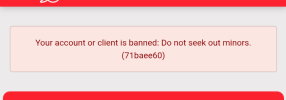
No, I'm not on a VPN.

Manvspencil

UKChat Celebrity
Joined
Aug 20, 2019
Messages
936
Reaction score
665
Which device and model are you using?
Google Pixel 10
Which OS and version are you using?
Android 17
How are you connecting?
Mobile data
Which web browser and version are you using?
Edge
Are you using special settings or extensions?
Nope
Did you update your software recently?
Nope.
What is the error message you're seeing?
Is attached.
Do you have a before and after screenshot?
Only after. I don't screenshot non-issues.
Have you attempted any troubleshooting?
Clearing down the app.
Describe how your issue develops.
When trying to log in on mobile data.
17629.png

What's going on here then? The bot isn't botting correctly.
 

elwoodbluz1966

Administrator
Staff member
Joined
Mar 17, 2020
Messages
2,701
Reaction score
387
That is detected by the site AI bot and does not relate to VPN use. It is because your device has been infected with malware.
 

Russowales

UKChat Familiar
Joined
Oct 6, 2026
Messages
269
Reaction score
158
Yeah makware spyware sends info and can be detected as possible infecting forum servers..its ai self defence
 

Manvspencil

UKChat Celebrity
Joined
Aug 20, 2019
Messages
936
Reaction score
665
That is detected by the site AI bot and does not relate to VPN use. It is because your device has been infected with malware.
On an attempt to log in a few moments prior it also said that I was on a VPN. I didn't take a screenshot of that though.
 

Manvspencil

UKChat Celebrity
Joined
Aug 20, 2019
Messages
936
Reaction score
665
Also, if I'm connected to the work or home WiFi, I can get in without an issue. Surely if it was a device problem it would stop me getting in regardless.
 

Russowales

UKChat Familiar
Joined
Oct 6, 2026
Messages
269
Reaction score
158
Go malwarebytes for scan,its good against malware free ones good too
Which connection does it happen on only? Phone, lap top ,or pc? Which wi fi?
 

Russowales

UKChat Familiar
Joined
Oct 6, 2026
Messages
269
Reaction score
158
If have malware that installed it might be a certain connection it "turns on.".thats why ask which wi fi only happens on
I would conect to that one..then try the malwarebytes told u abut
 

Russowales

UKChat Familiar
Joined
Oct 6, 2026
Messages
269
Reaction score
158
Copt this line below into google..shows malware does fake proxys and look like vpn..malwarebytes will fix on adroid..hope helps


can malware make forum security think users on vpn
 

Manvspencil

UKChat Celebrity
Joined
Aug 20, 2019
Messages
936
Reaction score
665
I ran the Malwarebytes scan, found nowt on my phone. Thanks for the advice on that though.

And both the work WiFi and home WiFi, not an issue either.
 

Russowales

UKChat Familiar
Joined
Oct 6, 2026
Messages
269
Reaction score
158
Ok weird.
One thing..if you have apps recently and dont need,uninstall maybe ..i hsd ads pop up cos had game app..mbytes missed..uninstalled and gone
 

Manvspencil

UKChat Celebrity
Joined
Aug 20, 2019
Messages
936
Reaction score
665
To me, it's something to do with the IP address for my mobile data. Most of the time it's not a problem, other times I just close my browser, swipe it away and then try get in again and it works. It's just being particularly troublesome this morning.
 

Russowales

UKChat Familiar
Joined
Oct 6, 2026
Messages
269
Reaction score
158
Ahh ok..go on ur provider site go ur account and change ur ip..try that..or unplug router for 10 mins reboot so it assigns ip
 

Manvspencil

UKChat Celebrity
Joined
Aug 20, 2019
Messages
936
Reaction score
665
Meh, it's only really so I can waste time on work breaks, I'm just out of range of the work WiFi where I go to vape. I'm sure it'll come back, it usually does.
 

Russowales

UKChat Familiar
Joined
Oct 6, 2026
Messages
269
Reaction score
158
using phone to connect a forum and get message using vpn but im not

A forum or app is likely detecting a false VPN error because your IP address is flagged, a private DNS is active, or a hidden profile is running on your phone.

Why This Happens

• Flagged IP Address: Your mobile carrier or internet provider uses shared IP ranges (like CG-NAT) where a different user's past activity caused the forum to block or flag the address.
• Private DNS or Ad-Blockers: Custom Private DNS resolvers (such as NextDNS or AdGuard) or built-in browser/security extensions route or modify your lookups in a way that triggers VPN filters.
• Relay or Privacy Features: Features like iCloud Private Relay on iPhones or similar carrier-level data-saving/privacy tools mask your direct connection.
• Leftover Profiles or Security Apps: An old VPN profile left in your phone's network settings or a third-party antivirus, firewall, or cleaner app running a background filter can trigger false alarms.

How to Fix It

• Switch your network: Turn off Wi-Fi and use mobile data (or vice versa) to see if a different IP address clears the error.
• Check Private DNS: Go to your phone's network or connection settings and set your Private DNS to Off or Automatic rather than a custom provider.
• Disable Apple Private Relay: If you are on an iPhone, go to Settings > [Your Name] > iCloud > Private Relay and temporarily turn it off.
• Inspect network profiles:
• On Android: Look under Settings > Network & internet > VPN to delete any inactive or leftover profiles.
• On iPhone: Look under Settings > General > VPN & Device Management to check for active profiles.
• Turn off security/antivirus apps: Pause any third-party ad-blockers, firewalls, or mobile security apps that might be intercepting your web traffic.
If you share what device you are using (iPhone or Android) and which forum or app is showing the message, I can give you exact steps to fix it
 
Back
Top