Navigation
Install the app
How to install the app on iOS
Follow along with the video below to see how to install our site as a web app on your home screen.
Note: This feature may not be available in some browsers.
More options
You are using an out of date browser. It may not display this or other websites correctly.
You should upgrade or use an alternative browser.
You should upgrade or use an alternative browser.
Can’t download pics
- Thread starter Taratits
- Start date

D
DirtyOldBastard
Guest
...rather than share it publicly to help others in the community who may have the same issue.Taratits I have a fix might work for you like it did me message me
I
IMBEHINDYOU
Guest
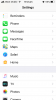
- Launch the Settings app from the Home screen of your iPhone or iPad.
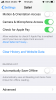
- Scroll down and tap on Safari.
- Now scroll all the way to the bottom and tap on Advanced.
- Tap on Website Data. ...
- Scroll to the bottom again and tap on Remove All Website Data.
- Confirm one more time you'd like to delete all data.
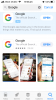
- Then go to the App Store and download the standard google app not chrome do a full log out of this web site and log back in and try sending a random photo it worked for me so hope it helps you
Attachments

R
Robbie69
Guest
@Funandflirty here it is !!
N
Nellie
Guest
Same issue here 